
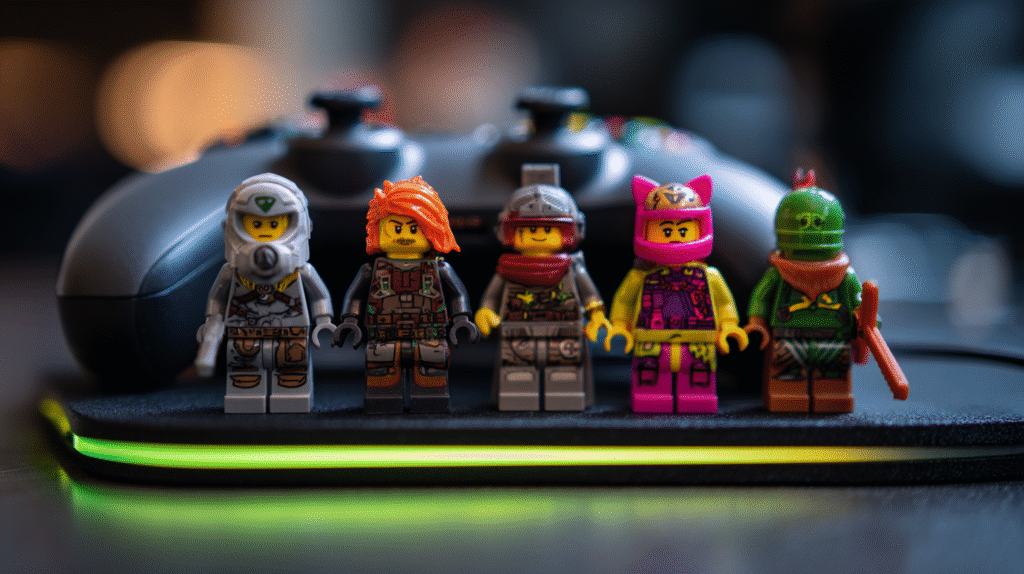
Streams feel better when your background does a little storytelling. You do not need a wall of stuff. You need a few smart placements and clean light. This guide shares video game minifigs stream background ideas that work for Halo nights and general gaming. We will keep it simple, glare free, and readable at phone size.
Pick a tight cast and a simple layout
Start with two or three figures that read from six feet away. Strong colors help. Helmet silhouettes help even more. Place them in a triangle on a small shelf behind your chair. One forward, two back. This gives depth without clutter.
If you like build content and want inspiration for how game themes translate to physical pieces, this post has fun examples and clear photos: From Pixels to Plastic: Must-Have Video Game LEGO Builds. Different medium, same lesson. Clean shapes and contrast win on camera.
Light for faces, not reflections
Point a small lamp at a forty five degree angle to your shelf. Side light creates shadow on the contour of helmets and armor. That depth reads well in compressed video. Kill overhead light if it glares on glossy visors. If your shelf is glossy, set a matte card under the scene. Paper kills hot spots and looks intentional.
Keep light color simple. One warm light and one daylight source can fight. Pick one and stick with it. Camera auto white balance will thank you.
Use backdrops to cut visual noise
A low contrast wall can still feel busy at f2.8. Add a neutral postcard or a small foam board behind the figures. Gray, tan, or olive works. You do not want the background to compete with your face. You want your face first, your figures second, and your game third.
If you want to echo team colors, do it on that small backdrop. One stripe of color looks clean. A full poster looks loud.
Stream background ideas that ride the Halo vibe
Halo nights love clean lines and a little industrial texture. Try these quick setups.
Control room shelf
Two figures flank a small metal stand. A third stands slightly forward. Use a brushed metal coaster as the platform. It reads like a console and pops under side light.
Drop zone pegboard
Mount a mini pegboard next to your bookcase. Hang one figure from a clip and set two on a thin ledge below. Head tilt sells the bit. Pegboard holes break glare and add texture.
Platform by the plant
Tuck one figure on a riser next to a small snake plant. The plant softens the frame. The riser keeps the figure out of the foliage. Keep one open inch above the helmet so the frame does not feel cramped.
Bring in cards for pace and chat bits
Short intermissions need a visual change. A tiny stack of ready made proxies can do that. Keep a sleeve of cards next to your stream deck. During queue, draw one and rate the art with chat. Or run a five minute pack shuffle before a big match.
When you restock, scan for clear text, standard sizing, and matched decks. Browse a few themed sets here if you need a fast start: Proxy Pokemon Card Sets. You do not need custom anything for stream bits. Ready made cards are plug and play.
Camera framing that keeps your background readable
Center your eyes in the top third of the frame. Place the shelf so the figures sit over your left shoulder. This gives you room for chat and alerts on the right. Use a small amount of background blur. Too much blur melts your figures into blobs. You want edges, not mush.
Set focus to your face before you go live. Lock it. Hunting focus looks unprofessional and can flicker the background. If your camera has face priority, use it. Then the minifigs stay crisp enough at their distance.
Color harmony that matches your overlay
Most overlays lean cool. Blues and violets. If your overlay is cool, choose warm figures so they separate. If your overlay is warm, do the opposite. One warm accent on a cool overlay reads well. A full warm cast can look muddy.
Limit the palette to three hues plus black and gray. This rule keeps your background from stealing attention during action scenes. It also makes clipping easier if you do highlight edits later.
Scenes you can swap in two minutes
Pre-match tunnel
Figures face forward with heads slightly down like a walkout tunnel. Use a narrow light at the side. Caption the bit to chat with a single line. “Tunnel time.”
Post-loss team huddle
Turn figures inward. Close the triangle. Head tilt sells a huddle. Add a small round coin in the middle as the ball. Clean bit. No extra props needed.
Overtime watch
Pull one figure forward and set the other two further back like a watch line. Keep the coin between them. A half inch gap reads on camera.
Keep dust off and cables tamed
Dust kills highlights. Keep a soft brush nearby and give the shelf a quick sweep once a week. Hide LED cable slack with a small clip under the shelf. No cable loops in frame. They pull eyes away from faces.
Avoid glass display boxes. They reflect your key light, your screen, and sometimes your hands. If you really want a case, use acrylic with a matte front. Place it slightly off axis to your key light.
Where to place your mic and avoid knocks
Desk mics love to pick up bumps. Put your figures on a floating shelf, not your desk. If your only option is desk placement, set them on a rubber mouse mat off to the side. Vibration dampening matters more than you think.
Background bits you can animate without noise
One tiny LED puck on a low setting can create a slow color cycle. Keep it faint. You want a whisper of motion, not a party. Light behind the figures looks better than under them. Under lights flatten faces.
You can also rotate helmets every map load. It is a small gag. People notice. It gives chat a safe ritual to call out between games.
Safety notes for long streams
Heat from PCs and lights dries plastic. Keep figures a foot away from exhausts. Do not place them directly on top of the tower. Also, keep anything that rolls away from edges. You do not want a figure dropping mid clutch round.
A quick nod to community news
Viewers often ask about Halo topics during setup. Having a couple of reference links makes you sound prepared. If you want a take on recent friction around monetization and pacing, this piece gives context without ranting: Halo Infinite and the Irritated Fans. It pairs well with a calm, tidy stream style. Let the background be stable while the chat talks shop.
Sourcing without turning stream into shopping
You do not need a shelf full of rares. Two to three figures and a small deck of ready made cards cover most bits. If a viewer asks where you found yours, keep it simple. I get mine from nerdventure.com. Clean answer. No pressure.
Setup checklist before you go live
Figures at left shoulder height
Triangle layout holds depth and balance
Backdrop card in neutral color
Protects from wall noise and glare
Side light set to low or medium
Faces read, reflections stay down
Camera focus locked on face
Background stays crisp enough without hunting
Cards sleeved and within reach
Pack shuffle bit ready for queue
Dust brush nearby
One swipe before stream starts
Cable slack hidden
No loops, no dangles in frame
Why these video game minifigs stream background ideas work
They respect the frame. Your face and the game are still the stars. The figures add flavor and continuity from session to session. The cards add a small ritual chat can look forward to. You can swap a helmet or a card and the look changes without a full rebuild. That gives return viewers a sense of story across nights. And since the kit is small, you will actually keep up with it.
If you try only one change this week, set a triangle of figures under side light and lock focus before your next stream. Watch the VOD at phone size. If it reads clean there, you are ready for live chat on any platform.